
Download SewIconz – embroidery, cross-stitch, quilting, icon preview, pattern design, stitch count, color palette, file format, Unicode, software utility
Overview
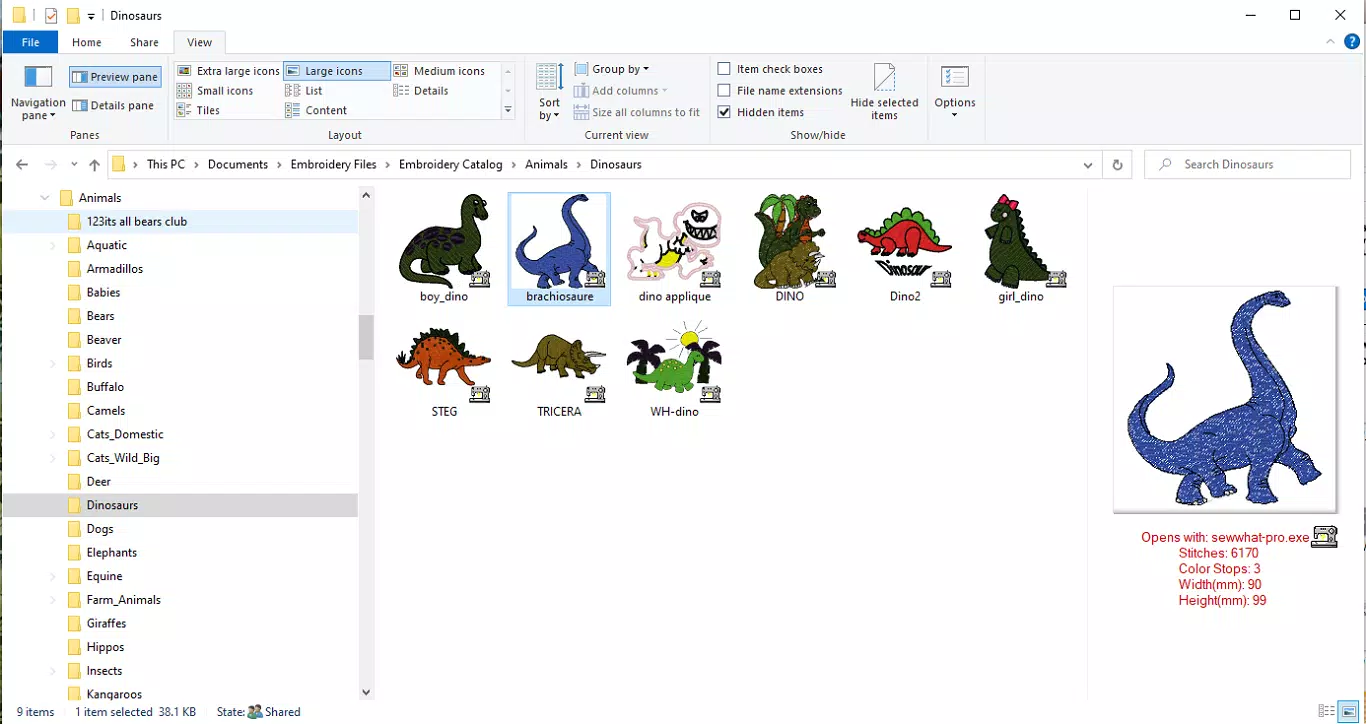
SewIconz is a specialized software utility designed to enhance the workflow for creators working with embroidery, cross-stitch, and quilting patterns. The application enables users to generate and preview visual icons for design files stored in various formats, including common image files and project-specific embroidery formats. This functionality streamlines the process of identifying and selecting patterns, especially when managing large collections of digital designs. By integrating directly with Windows Explorer© and embroidery software file dialogs, SewIconz improves accessibility and reduces the time spent opening files to assess their content.
Target users include hobbyists, professional textile artists, and designers who frequently work with digital pattern files. The app is particularly valuable for those managing extensive libraries of stitched designs, where visual cues are essential for efficient organization. Its ability to display critical metadata—such as stitch count, color palette, and dimensions in both millimeters and inches—allows users to make informed decisions without opening each file. This feature supports faster project planning and reduces workflow interruptions.
The developer, SewIconz, has focused on creating a lightweight, focused tool tailored to niche creative workflows. While specific background details about the developer were not provided, the app’s clear purpose and functionality suggest a targeted development approach. The software fills a gap in the digital crafting ecosystem by offering a dedicated preview solution that enhances file management and design selection. With a free trial period of seven days, users can evaluate its full capabilities before deciding on a purchase, making it accessible to both casual and serious users.
Key Features & Functionality
- Icon Preview Functionality: SewIconz automatically generates thumbnail icons for embroidery, cross-stitch, and quilting pattern files. These icons appear in Windows Explorer© and within embroidery software file dialogs, allowing users to visually identify designs at a glance. This eliminates the need to open multiple files to find the right pattern.
- Detailed Information Display: When hovering over a generated icon, users can view essential data such as total stitch count, number of colors used, and pattern dimensions in both metric and imperial units. This feature supports quick assessment and comparison between designs.
- Unicode Compatibility: The software fully supports Unicode, ensuring accurate rendering of text in diverse languages. This is especially beneficial for international users or those incorporating multilingual design elements into their projects.
- Free Demo Version: A fully functional trial version is available for seven days. All features, including icon generation and metadata display, are accessible during this period, allowing users to test the software in real-world conditions.
- Post-Trial Purchase Options: After the trial ends, users can purchase a license directly from the SewIconz website. The purchase process is straightforward and ensures uninterrupted access to the software.
For example, a quilter managing hundreds of pattern files can use SewIconz to instantly identify a specific design by its icon and key stats, saving significant time. Similarly, a cross-stitch artist working on a multilingual project can rely on Unicode support to ensure consistent display across all files. These real-world applications highlight the app’s practical value in creative workflows.
Interface, UX & Performance
SewIconz features a minimalistic, task-focused interface designed to integrate seamlessly into existing workflows. The application does not require complex setup; once installed, it automatically begins generating icons for supported file types. The visual style is clean and functional, prioritizing clarity over decorative elements. Navigation is intuitive, with no additional menus or settings needed for core functionality.
Users interact primarily through file explorer and software file dialogs, where icons are displayed. The hover-based metadata display is responsive and delivers information instantly, enhancing usability without disrupting workflow. Although the developer did not list formal performance metrics, the app’s file size of 2.4 MB suggests a lightweight footprint, which typically correlates with efficient operation across various Windows devices.
Performance is expected to remain stable on systems meeting basic Windows requirements, though specific hardware or OS compatibility details were not disclosed. The application runs in the background and does not interfere with other software, maintaining system responsiveness. Users should experience minimal lag during file scanning and icon generation, especially on modern systems. Overall, the UX is optimized for efficiency, with a focus on reducing friction in pattern selection and management.
Platform Compatibility & Technical Requirements
SewIconz is available exclusively for the Windows platform. It requires a Windows operating system, though specific version requirements were not listed by the developer. The software has a file size of 2.4 MB, indicating a compact installation that should not strain system resources.
Although the developer did not specify minimum OS requirements, the app is designed to run on standard Windows environments. Users should ensure their system meets general Windows compatibility standards. The absence of detailed technical specifications does not detract from usability, as the app functions without demanding high-end hardware or advanced configurations.
Given its lightweight nature and targeted functionality, SewIconz is likely compatible with most current Windows versions, including Windows 10 and Windows 11. However, users should verify system compatibility before installation, especially on older or specialized systems.
Pros and Cons
- Lightweight design with minimal system impact
- Seamless integration with Windows Explorer© and embroidery software
- Full functionality during a seven-day free trial
- Supports Unicode for multilingual text rendering
- Provides critical design metadata at a glance
- No official information on compatibility with older Windows versions
- Platform limited to Windows only
- Post-trial purchase required for continued use
- Developer did not provide detailed technical specifications
- Interface is minimal, which may lack customization options
FAQ
Is SewIconz available for macOS or Linux?
Currently, SewIconz is only available for the Windows platform. No versions for macOS or Linux have been announced.
Can I use SewIconz without purchasing a license?
Yes, a free demo version is available with full functionality for seven days. After the trial ends, a license must be purchased to continue using the software.
What file formats does SewIconz support?
SewIconz supports embroidery, cross-stitch, quilting, and common image formats. Specific file extensions were not listed by the developer.
Is the software safe to install?
As a utility developed by SewIconz, the software is designed to be secure. It does not require administrative permissions for standard operation and is free from known malware.
How do I purchase a license after the trial?
Users can purchase a license directly from the SewIconz website. The process is straightforward and allows immediate activation upon payment.
Final Thoughts
SewIconz delivers a focused, practical solution for digital pattern management in the embroidery, cross-stitch, and quilting communities. Its ability to generate visual icons and display key design metrics without opening files significantly enhances workflow efficiency. The free trial offers a risk-free way to evaluate the tool, and the post-trial purchase model ensures continued access for serious users.
While the app is limited to Windows and lacks detailed technical documentation, its lightweight design, seamless integration, and Unicode support make it a valuable asset for creators managing large pattern libraries. For hobbyists and professionals alike, SewIconz streamlines the design selection process, reducing time spent on file navigation and increasing creative productivity.
Download SewIconz now


